We ran a new image model, Meta Muse Image 1.0, through the test that matters to us and that no public leaderboard performs: not one edit, but ten in a row, each applied to the output of the last. Then we ran it again on three deliberately unlike subjects — a cliff house, an interior, and a floor plan in our own production style. Below is the method, the frames, and what broke.
Public model rankings — arena-style head-to-heads, aggregate benchmark dashboards — measure a single pass. Somebody writes a prompt, two models answer, a human picks one. That is a real signal about a real capability, and it is not the capability an architect uses.
An architect’s morning is a chain. You have a concept, and then you have a client on the phone: the pool should be L-shaped, the roof should be tile and not thatch, the timber is too dark, add a guest wing, lose the frangipani. Each of those is applied to the image the last one produced. By instruction ten you are looking at a picture with ten generations of accumulated decisions in it — and the question is whether it is still your building.
Nobody measures that. So we measure it.
This is a companion to what eight sequential edits do to an AI architecture image. That run compared three editing engines on one seed. This one compares three generation models asked to edit their own work, ten times, and then takes the model that came through that chain best into three more subjects, chosen to be as unlike each other as possible.
The first look: two models, two steps
The shortest possible version of the test. Four models — Muse Image 1.0, Grok Imagine Image 2.0, Gemini 3.1 Flash Image and Gemini 3.1 Flash Lite — were given the same brief for a two-storey villa in Ras Al Khaimah, then handed back their own output with one instruction: replace the rectangular pool with a curved, organic-edged one, keep everything else identical.
Two steps is enough to answer one question — does the model treat a reference image as something to preserve or as a suggestion — and not enough to answer any of the interesting ones. Muse held its own scene. That earned it the longer run, nothing more.
The real test: ten edits on one villa
One brief: a contemporary architect’s reinterpretation of a Javanese joglo in Bali. Two storeys, thatch roof on ironwood posts, dark timber wings, a lap pool. Each of three models generated its own seed from that identical prompt, then received the same ten instructions in the same order:
- Make the lap pool L-shaped
- Replace the thatch roof with dark clay tiles
- Change the dark timber to pale teak
- Add a small separate pavilion
- Remove the frangipani tree
- Replace the lawn with pale pebbles
- Glaze in the open veranda
- Add a two-storey guest wing
- Add a light strip along the roof ridge
- Add a shallow water channel
Every edit went to the model’s own previous frame. Every edit carried the same keep-clause: same building, same materials, same objects in the same places — and an explicit camera lock naming zoom, crop, re-framing, focal length, viewpoint, height and angle.
The lighting was frozen on purpose. Flat overcast midday, no direct sun, no strong shadows — set in the seed prompt and forbidden in every single edit. This is not an arbitrary choice. In an earlier run we let a re-lighting instruction into step eight, and it rewrote every pixel in the frame. After that, asking whether step nine had drifted was meaningless: the chain had already been replaced. A degradation test with a re-light in it is not a degradation test.
Gemini 3.1 Flash Lite: visible collapse from about step six
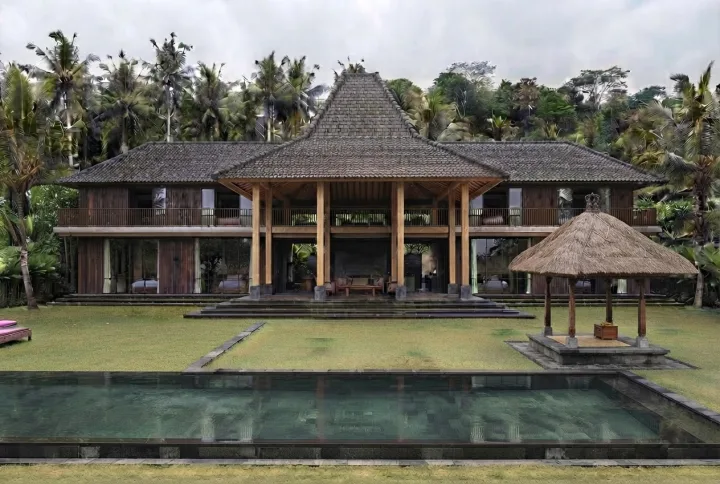
Step 5. Tiles, pale teak, an extra pavilion, no frangipani — the frame is still holding together.
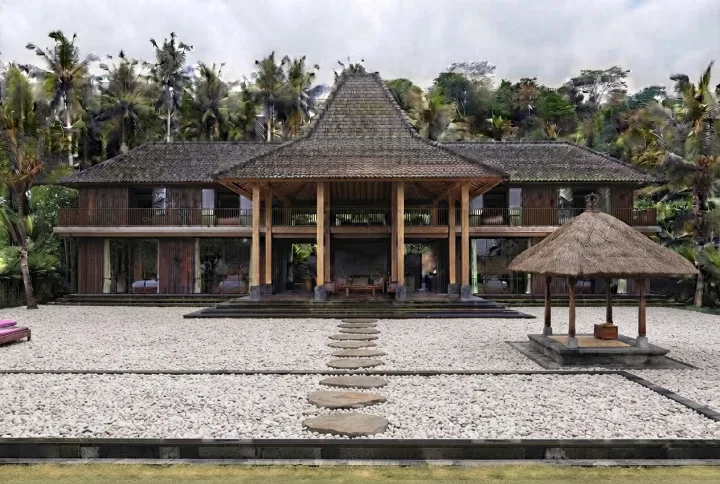
Step 6, the pebble edit. Look at the palms and the ridge line: bright halos along every contour, and the foliage has started to break up.
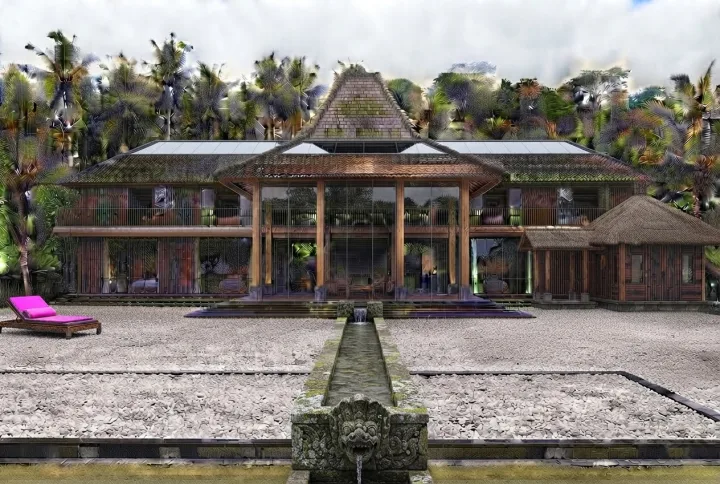
Step 10. Coloured artefacts across the vegetation, smeared trees, a magenta lounger that nobody asked for. The instructions were all obeyed; the image is no longer usable.
The collapse has a number attached to it. At fixed resolution, file weight is a rough proxy for how much high-frequency content an image contains — and noise and sharpening halos are high-frequency content. Across the Lite chain, file weight rose to 1.28× the first frame, and the jump starts exactly at step six: 1.04 at step five, 1.23 at step six. That is the same step where the damage becomes visible by eye — both readings put the boundary at the same step.
Gemini 3.1 Flash Image: clean, but the building walks away
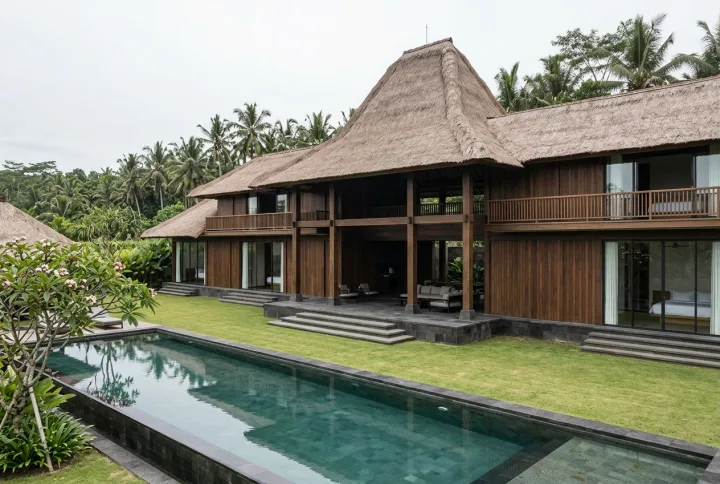
The seed. The house sits right of centre and fills the frame; the pool runs into the bottom-left corner.
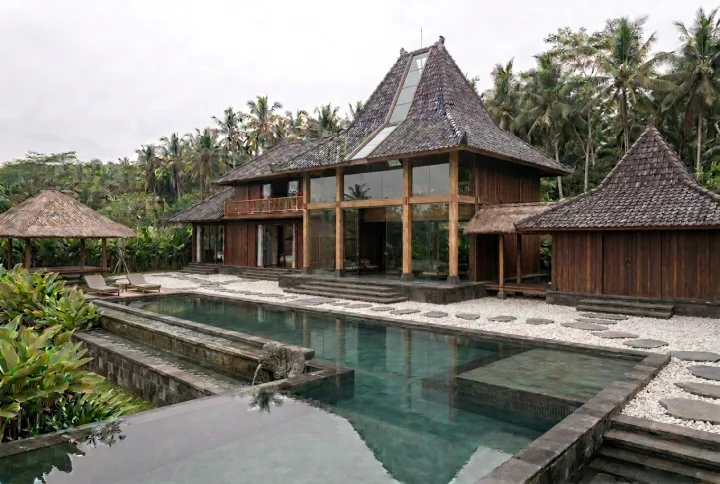
Step 10. Tiles, teak, pebbles, a guest wing, a water channel — all present. The camera has also pulled back and centred the building, which nothing in any instruction asked for.
This model does not noise up. Its file weight moves 1.02× across the whole chain, because its failure mode produces no high-frequency content at all: it softens. Vegetation loses definition pass after pass, gently enough that no single step looks wrong.
The composition is the bigger problem. The seed put the house large and right-of-centre. Ten passes later it is smaller and centred, with site visible on both sides. Each individual step moved it slightly; the camera lock in the prompt did not prevent any of it. If you built a client presentation from step three and step ten, they are two different photographs of two different sites.
This is worth being precise about, because it is a genuine trap: nothing about the step-10 image looks broken. It is a competent architectural render. It is just not the image you were editing.
Muse: soft decay, no artefacts
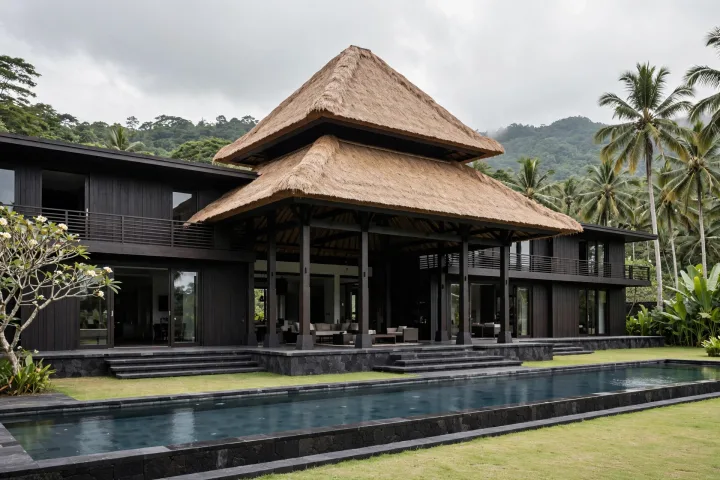
The seed, from the same brief the other two models received.
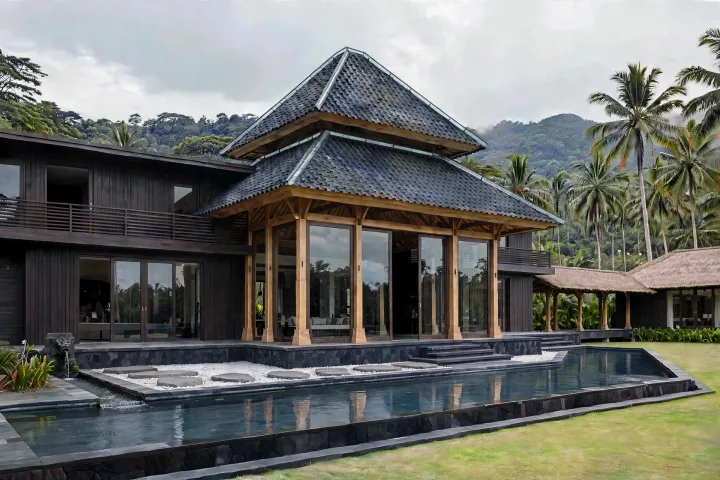
Step 10. Tile roof, pale teak, glazed veranda, pebbles, water channel. Ten passes in, it still reads as a photograph — clean edges, honest stone and timber, no coloured debris.
At step ten the frame still reads as a photograph rather than a render of a render. Edges stay clean, stone and timber keep their grain, there is no coloured debris anywhere. The decay is real but gentle: surfaces very slightly lacquered, a general tidiness creeping into materials that started rougher. File weight lands at 1.10× — between the other two, which is what a chain that neither noises nor over-smooths should look like.
It is not exempt from the camera problem. Where Gemini pulls back, Muse pushes in. Same lock, same ten repetitions of it, opposite direction of disobedience. We could not solve this with prompt language in any model we tested. If you need framing held across a long chain, words are not enough — check each frame against the seed rather than against the one before it.
Three anchors: does it hold on subjects that hide nothing?
One villa in a jungle is a forgiving test. Thatch, foliage and stone are exactly the textures where drift can hide. So we ran the model again — thirty more edits, ten each — on three subjects chosen because they hide nothing.
Cliff house: geometry with nowhere to hide
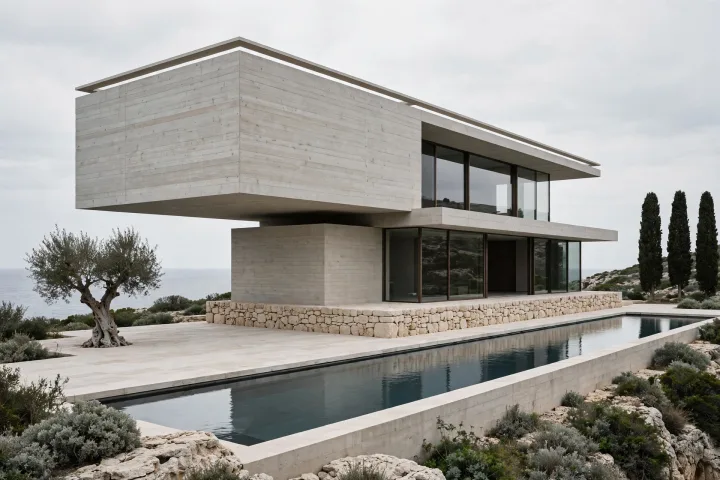
The seed: two board-formed concrete volumes, the upper cantilevered, a rectangular reflecting pool, sea horizon behind.
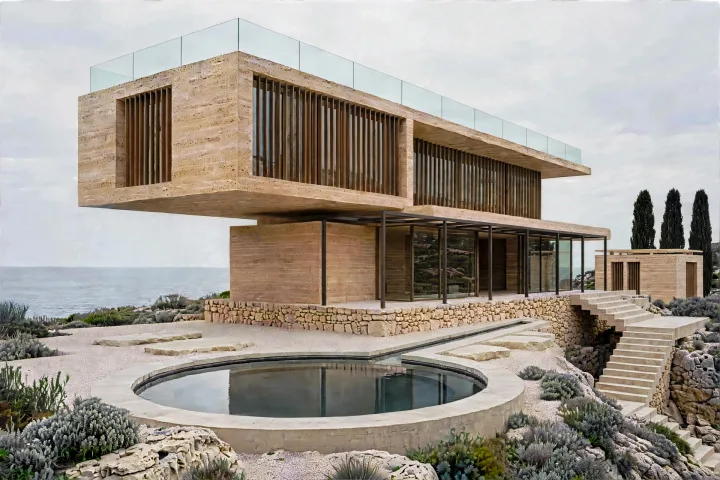
Step 10. Travertine instead of concrete, bronze louvres on the upper glazing, a circular pool, gravel and stepping stones, a glass balustrade, a guest pavilion right, an external stair. The cantilever, the plinth and the horizon survived; the camera crept in.
Hard concrete, flat glass, a dead-straight sea horizon. Nothing here can be blurred into plausibility — a wobble in a cantilever edge or a tilt in the horizon is instantly visible.
Interior: straight lines make camera drift obvious
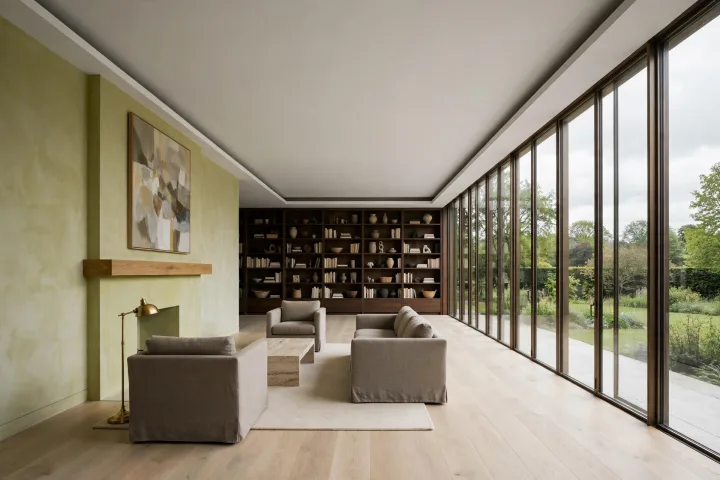
The seed: one-point perspective down the room, glazing on the right, fireplace left, bookshelf on the end wall.
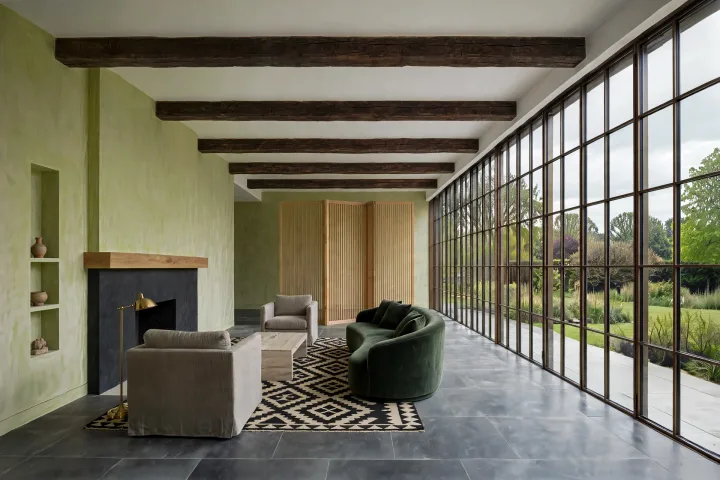
Step 10. Stone floor, exposed beams, curved velvet sofa, slatted screen, black stone fireplace, gridded glazing, patterned rug, a recessed niche left of the fireplace. The vanishing point is close to the seed’s — of the three anchors, this one drifted least.
An interior has no sky, no landscape, no leaves — and it has ceiling lines, floor joints and window mullions all converging. Any camera shift shows up as a change of vanishing point, which the eye catches immediately. This anchor exists to make drift measurable by looking rather than by argument — and it is where the model held best. The two exterior anchors both crept; the interior, with the most visible geometry in it, stayed closest to its seed.
Floor plan: our own production style, read from the source
The third anchor is the one we cared about most, and it breaks in a completely different way. There is no texture to soften on a plan. Instead, drift arrives as wall thicknesses that wander, a drawing that creeps across the sheet — and, worst of all, text.
The style rules here were read straight out of our own product code rather than rewritten for the test, so the run measures the thing we actually ship: white ground, solid black walls with exterior noticeably thicker than partitions, doors as clean breaks in the wall, schematic grey furniture, and absolutely no text of any kind — no room names, no numbers, no dimensions, not one letter.
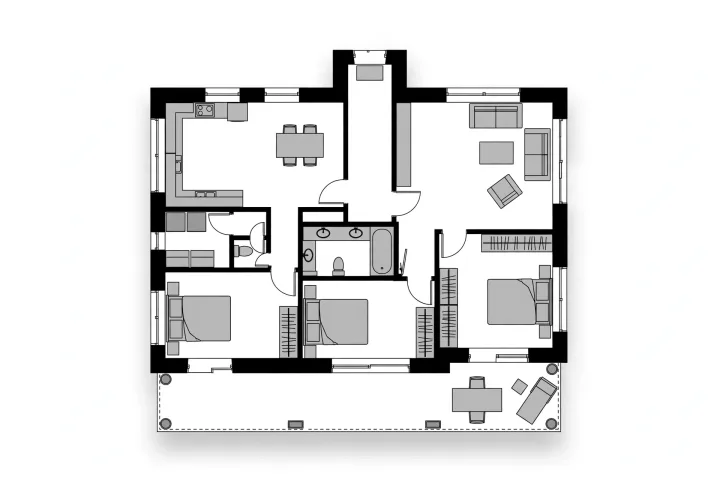
The seed plan, generated from the production style rules.
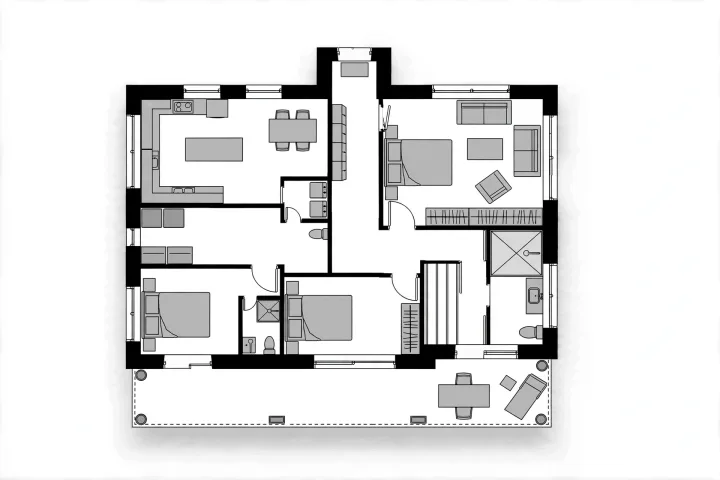
Step 10. Living and dining merged, kitchen enlarged, utility room added, WC absorbed into the bathroom, en-suite and walk-in wardrobe added, terrace extended, hall opening widened, kitchen furniture drawn, storage cupboard added. Still zero text.
Thirty of thirty edits completed across the three anchors, every frame 1920×1280. On the plan, after ten passes: no text anywhere, walls still solid black, exterior walls still thicker than partitions, furniture still grey and schematic, the drawing still sitting on the sheet at roughly its original position and scale.
And a failure that is ours to fix. Our style prompt forbids door swing arcs — doors should be clean gaps, not quarter-circles. Muse draws the arcs. It draws them in the seed, before any editing has happened, so this is not accumulated drift; it is an instruction that was not followed from the first frame. We spotted it, we are looking into it, and it is in this article because leaving it out would make the rest of the article less trustworthy.
What we take from this
A chain is a different test from a prompt, and only the chain predicts a real session. A model can win single-shot comparisons and still walk your building across the frame by the tenth pass. If you evaluate a model for design work, evaluate it the way you will use it.
The failure modes are not on one axis. Coloured artefacts, soft blur and composition drift are three different problems with three different consequences. Artefacts are obvious and therefore harmless — you see them and stop. Blur is slow. Composition drift is dangerous precisely because the result still looks like a good photograph.
Written camera locks do not hold. We wrote the most explicit prohibition we could — zoom, crop, re-framing, focal length, viewpoint, height, angle, named individually, restated in every one of ten edits — and no model obeyed it. Plan for it: branch from saved images, compare against the seed rather than the last frame, and settle framing early.
Lock the light before you start. Every one of these chains was only measurable because the light was fixed in the seed and defended in every edit. That is good practice outside a benchmark too. Settle the building under boring flat light; go for atmosphere at the end, once nothing structural is still moving.
The frames in this article are the real ones from those runs, unretouched, chosen to include the steps where things go wrong. If you want to try the same method inside a project rather than a script, that is what branching and iterative refinement are for in Nuit.